
Dynamic EQ: Precise Control, Exactly When It Matters (VST3 / AU / AAX)
Precise static tone-shaping, per-band dynamic gain control, real-time problem-frequency detection, and freehand curve drawing — all inside a single 8-band equalizer.
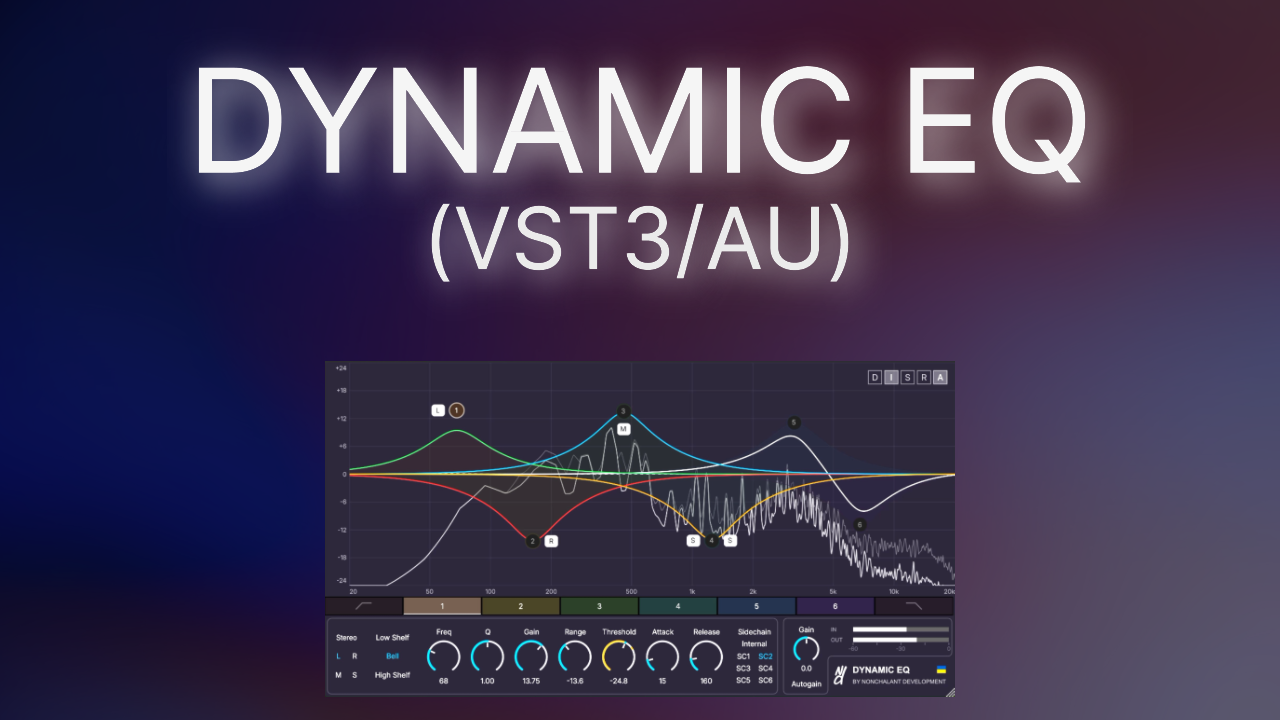
The Story
Welcome to Dynamic EQ. This plugin combines precise static tone-shaping with per-band dynamic (level-triggered) gain control, real-time problem-frequency detection, and a freehand curve-drawing workflow, all inside a single 8-band equalizer.
Designed for engineers who want the speed of a modern EQ without giving up the control of a true dynamics processor, it bridges the gap between everyday corrective EQ and dedicated multiband dynamics tools. It began life as a Max for Live device and has been rebuilt as a native C++/JUCE plugin so it runs directly inside Pro Tools, Cubase, Studio One, Logic Pro, and any other VST3/AU/AAX host, without needing Max for Live installed.
Unlike a plain static EQ, every band can be told to only engage once the signal crosses a threshold you set. By separating the static shape from the dynamic behaviour, you have surgical control over exactly when and how much any given frequency region moves — whether you're taming a resonance that only flares up occasionally, de-essing a vocal, or carving space for a kick drum only while it's actually hitting.
What You Get
- The Dynamic EQ Plugin: Native VST3, AU, and AAX formats.
- The Comprehensive User Manual (PDF): A deep-dive guide covering the interface, the dynamic EQ engine, resonance and clash detection, and practical mixing/mastering recipes.
Key Features
- 8-Band Engine: Dedicated Low Cut and High Cut filters plus 6 fully parametric bands (Low Shelf / Bell / High Shelf).
- Per-Band Dynamics: Independent Threshold, Range (±48 dB), Attack, and Release turn any of the 6 parametric bands into a true dynamic EQ, with both downward (compressive) and upward (expansive) behaviour.
- Internal & External Sidechain: React to a band's own filtered signal, or route in up to 6 external sidechain sources (SC1–SC6) so one track's dynamics can be driven by another entirely.
- Resonance & Clash Detection: Surface problem frequencies on Internal sidechain, or find exactly where two sources are masking each other on an External source.
- Stereo, L/R, and Mid/Side Routing: Process the full stereo signal, a single channel, or the Mid/Side components independently on every parametric band.
- Draw / Sketch Mode: Freehand-sketch a target curve and have it automatically matched onto real bands.
- Summed View: Monitor the true combined Left/Right output plus Mid/Side ghost curves before committing to changes.
- Real-Time Spectrum Analyzer & Autogain: A fixed-scale FFT overlay with peak-hold, plus deterministic, curve-based level compensation for reliable A/B comparisons.
- Modern resizable UI.
- Known limitations:
• In Logic Pro, it's not possible to add Dynamic EQ to a mono track (workaround: record a mono track and then switch it to stereo);
• In Logic Pro, direct clicks on the panel arrow icon may not register (workaround: click anywhere along the horizontal strip containing the arrow, or use the Down Arrow / Up Arrow keys);
• In Ableton Live, only the active parameter is visible for automation (workaround: use the Max for Live version of our Dynamic EQ);
• Your DAW should support multi-sidechaining to use all 6 external sidechain sources.
Watch it in Action
Reviews
Release Notes
v1.2.02 September 2026
- New Feature: Overview panels added to adjust controls for all enabled bands simultaneously (Panel 1: static controls; Panel 2: dynamic controls and sidechaining). Toggle via the bottom arrow or keyboard shortcuts (Down Arrow / Up Arrow).
- Fix: Resolved an issue introduced in v1.1.0 where the plugin failed to preserve window size settings across session reloads in certain DAWs.
v1.1.026 August 2026
- New Feature: Bypass button was added near the meters.
- New Feature: Added Auto-Renumber Bands setting in About window (displays dual label e.g., '2(5)' to assist with DAW automation).
- Improvement: Slope range for Low Cut (High Pass) and High Cut (Low Pass) was increased (6, 12, 24, 36, 48, 60, 72, 84, 96 dB/oct).
- Improvement: Gain range choices increased (±6, ±12, ±18, ±24, ±30, ±36, ±42, ±48 dB).
- Improvement: Mouse wheel over gain range indicators now adjusts the visible gain range.
- Improvement: Added default Gain Range choice in the About window (applies to new instances).
- Improvement: Added keyboard shortcuts: 0 (toggle all enabled band tooltips), 1-6 (select bands 1-6), 7 (select Low Cut), 8 (select High Cut).
- Improvement: Default Q set to 0.70 for shelves and Low Cut / High Cut filters, and 1.00 for Bell filters.
- Improvement: Keyboard editing for knob values now remains centered.
- Fix: Resolved a crash when High Cut frequency was set to 24000 Hz.
- Fix: Resolved a Draw mode bug where approximated Low Cut and High Cut filters defaulted to the lowest slope instead of matching drawn line steepness.
v1.0.019 August 2026
- Initial release.
Try the Demo
Limitations:
- Choose Your Limitation: On first launch, pick Feature-Limited (single band active, Draw mode preview-only) or Periodic Silence (all 8 bands unlocked, output briefly ducks every 16 seconds)
- State Management Disabled: DAW state saving and session recall are disabled (all settings reset when the plugin window is closed).
Requirements
Any DAW supporting VST3, Audio Units, or AAX (macOS, Windows, Linux). Linux version compiled on Ubuntu 22.04.5 LTS. Not compatible with Studio Pro on Linux.
Current Version
v1.2.0 (Updated 2 September 2026)